Think about how many important decisions happen in your inbox: a supplier sends new banking details, a customer approves a quotation, or a colleague shares a document. Most of these messages are routine. That's precisely why a convincing fake can be difficult to spot.
A professional email address and a trusted email platform are important, but they aren't the whole security plan. The risks below are common enough that every small business should know what to look for.
Here are eight risks worth checking.
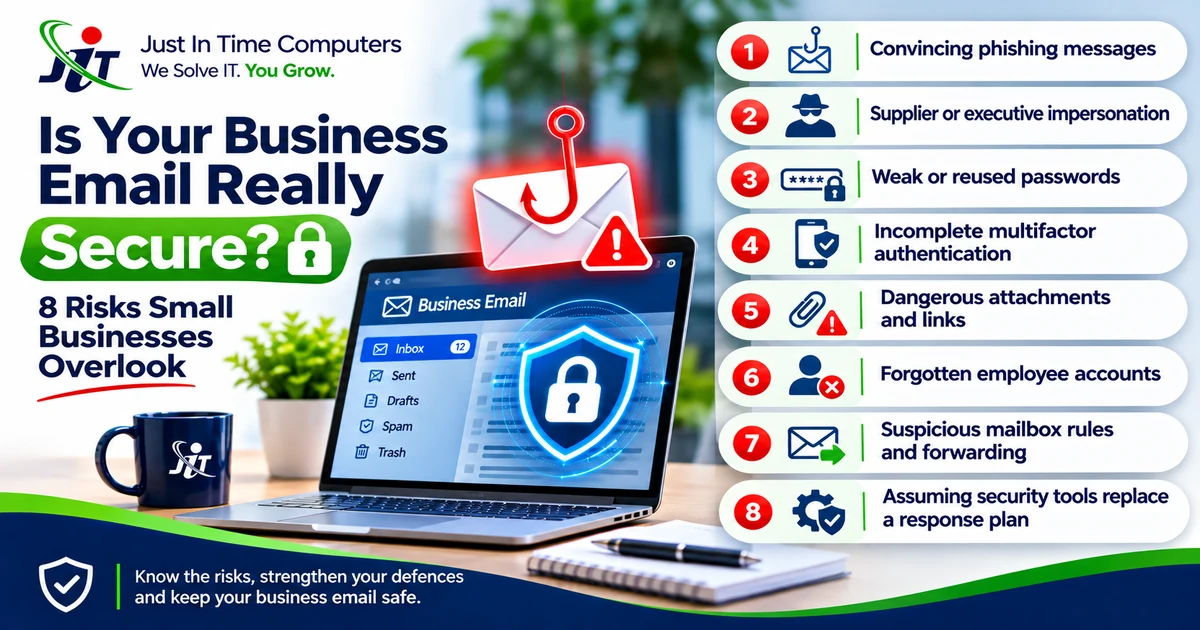
1. Convincing phishing messages
A message may look like it came from a bank, courier, supplier or Microsoft 365 administrator. It asks someone to click a link, open a document or sign in. The safest habit is to verify unexpected requests through a known contact method rather than the details inside the message.
2. Supplier or executive impersonation
An attacker may pretend to be a director or supplier and request an urgent payment or bank-detail change. Businesses should require independent confirmation for changes to payment instructions, even when an email looks familiar.
3. Weak or reused passwords
A password used on multiple services creates unnecessary risk. Use unique passwords and a reputable password manager, and enable multifactor authentication wherever supported.
4. Incomplete multifactor authentication
Some staff accounts may have extra sign-in protection while others do not. Review all active accounts, especially administrators, finance staff and shared or legacy accounts.
5. Dangerous attachments and links
Invoices, CVs and shared-document notifications can be used to deliver malicious files or direct users to fraudulent websites. Email filtering can reduce exposure, but employees still need a clear way to report suspicious messages.
6. Forgotten employee accounts
An account left active after an employee departs may retain access to business email and documents. Establish an authorised offboarding process to disable access, review forwarding rules and transfer information appropriately.
7. Suspicious mailbox rules and forwarding
If an account is compromised, an attacker may create rules to hide messages or forward copies elsewhere. Investigating unusual mailbox behaviour and sign-in alerts is important, especially after a suspected phishing incident.
8. Assuming security tools replace a response plan
Monitoring and filtering help identify or block certain threats. They do not guarantee that every malicious email will be stopped or that an incident will be resolved automatically. Decide in advance who investigates alerts, who can disable an account and how staff report urgent concerns.
A realistic example: the changed banking details
Imagine a supplier sends an invoice with new payment details. The email looks familiar, the amount is expected and the payment is due today. Someone in accounts pays it.
Only later does the real supplier ask why the invoice remains outstanding.
A simple independent phone call to a previously verified number could have interrupted that chain. Technology helps, but good procedures still matter.
What should a small business do first?
Start with a short review: confirm multifactor authentication, check active users, review administrator access, agree on payment-verification procedures and make sure employees know how to report suspicious email.
Then assess whether the business needs ongoing visibility into potential threats or additional protection for incoming email. The right combination depends on the systems in use and who will respond when something needs attention.
Explore JITC's standalone security offering: https://jitc.co.za/security-center
Related service: https://jitc.co.za/services/cybersecurity
Turn the insight into a practical next step.
JITC helps Johannesburg businesses make practical decisions about technology, online visibility and growth.
0 comments
No approved comments yet. Share a useful question, experience or perspective.
Leave a comment
Comments are reviewed before publication. Your email address is used for moderation only and is never shown publicly.